
Project management software is a digital platform used to plan, schedule, assign, monitor, and report project work. Project management software organizes project information and supports planning, execution, monitoring, collaboration, and reporting in a shared digital workspace. It can connect tasks, schedules, dependencies, resources, documents, progress measures, and team communication so managers can see how work is moving toward project objectives.
This updated project management tools comparison explains how to compare project management software objectively rather than naming one universal best project management software. It reflects publicly listed product capabilities and plan structures. Since vendors frequently change features, usage limits, AI access, and prices, verify current commercial terms before purchase.
The software supports, but does not replace, the management discipline itself. A project manager still needs to define objectives, make decisions, communicate with stakeholders, manage constraints, and interpret performance information. For this reason, software should be understood within the wider fundamentals of project management and project objectives.
Project Management Software vs Task Management Software
The main difference is scope: task management software primarily organizes individual or team tasks, while project management software connects tasks to schedules, dependencies, resources, reporting, governance, and broader project outcomes. The distinction becomes more important as projects become larger, more interdependent, or more heavily controlled.
| AREA | TASK MANAGEMENT SOFTWARE | PROJECT MANAGEMENT SOFTWARE |
|---|---|---|
| Primary purpose | Organize, assign, prioritize, and complete tasks. | Plan and control a temporary initiative from objectives through delivery. |
| Typical scope | Personal work, recurring workflows, or simple team coordination. | Projects with schedules, dependencies, milestones, resources, risks, budgets, or reporting needs. |
| Common capabilities | To-do lists, Kanban boards, assignees, due dates, reminders, and comments. | Task management plus Gantt or timeline planning, dependencies, workload views, dashboards, portfolios, automation, and controls. |
| Best use | When the main problem is coordinating work items. | When managers need visibility into how work, time, people, cost, and outcomes interact. |
This project management software vs task management software distinction also explains why a simple board may be sufficient for one team but inadequate for a multi-project environment.
What Should You Compare in Project Management Tools?
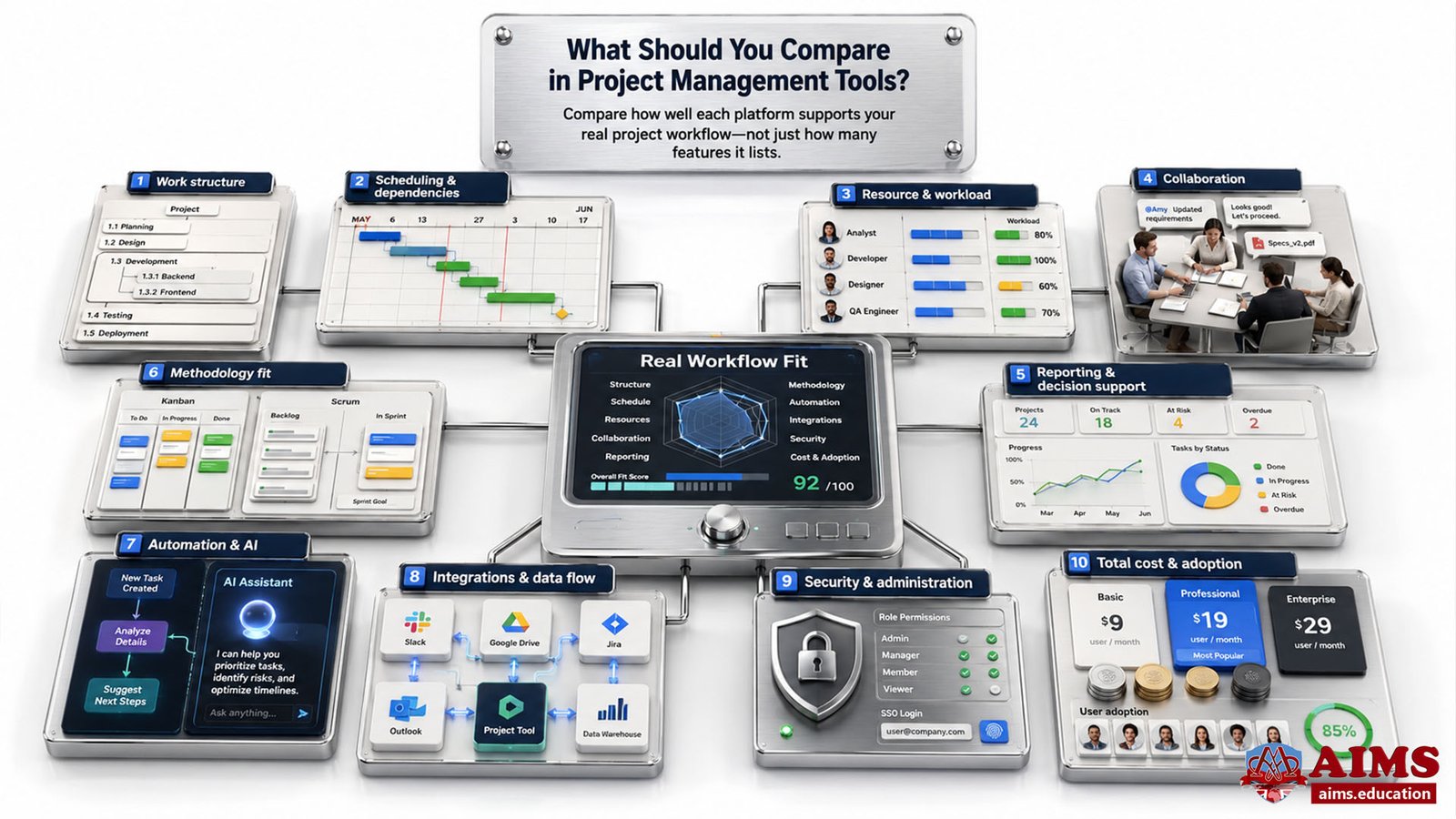
A strong project management software features comparison should evaluate how well each platform supports your real project workflow, not simply count features. Start with the work your team must perform, the decisions managers must make, and the controls stakeholders require.
- Work structure: Check whether the platform supports tasks, subtasks, milestones, custom fields, reusable templates, priorities, ownership, and useful hierarchy.
- Scheduling and dependencies: Complex projects often need dependency logic, milestones, baselines, critical-path visibility, and Gantt charts for project scheduling and control.
- Resource and workload management: Managers should be able to see capacity, assignments, overload, availability, and, where relevant, cost or utilization.
- Collaboration: Evaluate comments, notifications, file sharing, approvals, guest access, team conversations, and how easily context stays attached to the work.
- Reporting and decision support: Dashboards should help managers interpret progress, exceptions, trends, and project KPIs and performance indicators, rather than merely display activity.
- Methodology fit: Teams using predictive, Agile, or hybrid delivery need different controls. For example, an Agile team may require backlogs, sprints, velocity or burndown reporting, while a predictive project may require deeper schedule and dependency control. See how Agile project management works in practice.
- Automation and AI: Compare what the software can automate, summarize, generate, prioritize, or flag, but also check plan limits, permissions, data access, governance, and additional AI charges.
- Integrations and data flow: A tool is more valuable when it connects effectively with the document, communication, development, finance, CRM, calendar, and identity systems your organization already uses.
- Security and administration: Larger organizations should assess roles, permissions, single sign-on, auditability, data residency, guest controls, and administrative policy options.
- Total cost and adoption: Project management software pricing should be evaluated beyond the license fee. Include paid add-ons, AI access, guest or collaborator rules, implementation, migration, administration, training, and the cost of poor user adoption.
A practical rule is simple: the strongest tool is the one your team can use consistently while still giving managers enough control and decision-quality information.
Project Management Software Comparison Table
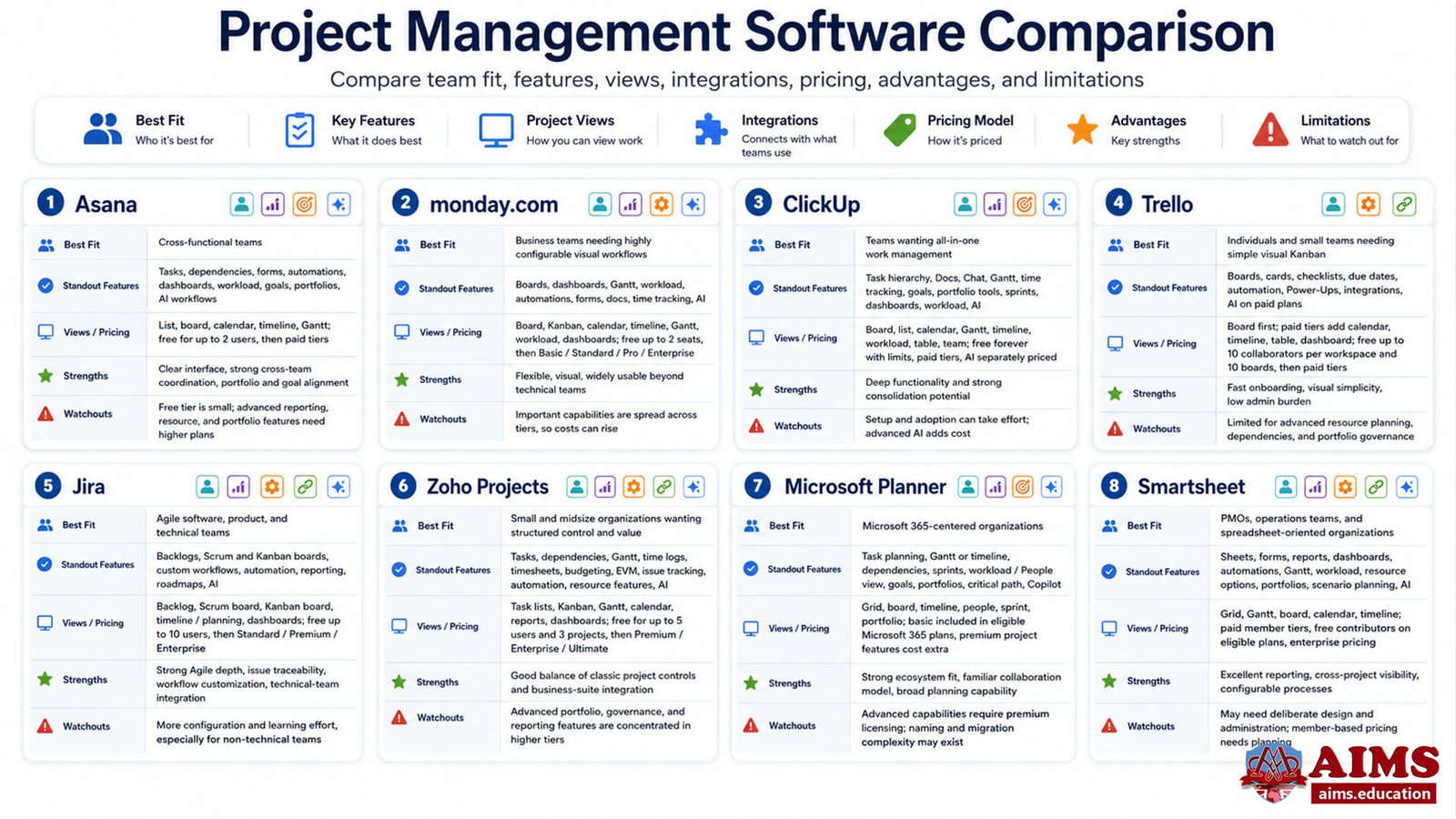
The leading platforms differ less in whether they can manage tasks and more in how deeply they support scheduling, Agile work, resource planning, portfolio visibility, reporting, automation, AI, and enterprise governance. If you need a project management software comparison chart, the project management software comparison table below focuses on fit and trade-offs rather than declaring a single winner. The best project management tools are those that match the operating context rather than simply offering the most features.
| SOFTWARE | BEST FIT FOR | KEY FEATURES | PROJECT VIEWS | ECOSYSTEM / INTEGRATIONS | PRICING MODEL | ADVANTAGES | LIMITATIONS |
|---|---|---|---|---|---|---|---|
| Asana | Cross-functional teams that want structured work management, dependencies, reporting, goals, and portfolio visibility. | Tasks, dependencies, forms, automations, dashboards, workload tools, goals, portfolios, and AI-assisted workflows on eligible plans. | List, board, calendar, timeline, and Gantt. | Broad business-app integration ecosystem. | Free Personal plan for up to two users, then per-user paid tiers and enterprise plans. | Clear interface, strong cross-team coordination, and useful portfolio and goal alignment at higher tiers. | The free tier is very small, while advanced portfolio, resource, and reporting needs require higher plans. |
| monday.com | Business teams that want highly configurable visual workflows across projects and operational processes. | Boards, dashboards, Gantt planning, workload views, automations, forms, documents, time tracking on relevant tiers, and AI capabilities. | Table or board-based workspaces with Kanban, calendar, timeline, Gantt, workload, and dashboard options depending on plan. | Large integration marketplace for business applications. | Free plan for up to two seats, followed by per-seat Basic, Standard, Pro, and Enterprise tiers. | Flexible configuration, strong visual management, and broad use across non-technical departments. | Important capabilities are distributed across tiers, so cost can rise as teams need more automation, reporting, or control. |
| ClickUp | Teams that want tasks, documents, chat, time tracking, sprints, dashboards, and resource tools in one workspace. | Task hierarchy, Docs, Chat, Gantt, time tracking on paid tiers, goals, portfolio tools, sprint management, dashboards, workload management, and separate AI offerings. | Board, list, calendar, Gantt, timeline, workload, table, team, and other configurable views. | Broad integrations plus built-in collaboration and documentation tools. | Free Forever plan with unlimited members but usage limits, followed by per-user paid tiers; advanced AI is separately priced. | Broad functional depth and strong consolidation potential for teams trying to reduce tool sprawl. | The breadth of configuration can increase setup and adoption effort, and advanced AI adds separate cost. |
| Trello | Individuals and small teams that prioritize simple visual Kanban-style work management. | Boards, cards, checklists, due dates, automation, Power-Ups, integrations, and AI features on paid plans. | Board is central; paid tiers add calendar, timeline, table, dashboard, and other views. | Strong Atlassian ecosystem and Power-Up model. | Free plan for up to ten collaborators per workspace and ten boards, followed by per-user Standard, Premium, and Enterprise tiers. | Fast onboarding, excellent visual simplicity, and low administrative burden for straightforward workflows. | Less suitable when projects need detailed resource planning, advanced dependency control, or portfolio-level governance. |
| Jira | Agile software, product, and technical teams that need backlogs, Scrum or Kanban workflows, automation, and detailed issue tracking. | Backlogs, Scrum and Kanban boards, customizable workflows, automation, reporting, roadmaps or planning features, and Rovo AI capabilities on paid plans. | Backlog, Scrum board, Kanban board, timeline or planning views, and reporting dashboards depending on configuration and plan. | Deep Atlassian ecosystem and strong integration with development workflows. | Free for up to ten users, followed by per-user Standard, Premium, and enterprise options. | Strong Agile depth, workflow customization, issue traceability, and technical-team integration. | Can require more configuration, administration, and learning than simpler tools, especially for non-technical teams. |
| Zoho Projects | Small and midsize organizations that want structured project control, time tracking, budgeting, and integration with the wider Zoho ecosystem. | Tasks, dependencies, Gantt charts, time logs, timesheets, budgeting, EVM on paid tiers, issue tracking, workflow automation, resource features, and Zia AI capabilities. | Task lists, Kanban, Gantt, calendar, reports, and dashboards depending on plan. | Strong fit with Zoho applications plus Google and Microsoft integrations. | Free tier for up to five users and three projects, followed by paid Premium, Enterprise, and Ultimate tiers. | Good balance of classic project controls and business-suite integration for cost-conscious teams. | Advanced cross-project resource, portfolio, governance, and reporting capabilities are concentrated in higher tiers. |
| Microsoft Planner | Organizations already centered on Microsoft 365 that want task management and premium project planning in the same ecosystem. | Basic task planning plus premium Gantt or Timeline views, dependencies, sprints, workload or People view, goals, portfolios, critical path, and Copilot-enabled capabilities with relevant licensing. | Grid, board, timeline, people, sprint, portfolio, and other planning views depending on plan. | Tight integration with Microsoft Teams and the Microsoft 365 environment. | Basic Planner is included in eligible Microsoft 365 subscriptions; premium project capabilities use additional per-user Planner plans. | Strong ecosystem fit, familiar Microsoft identity and collaboration model, and increasingly broad planning capability. | Advanced capabilities require premium licensing, and the transition from older Microsoft Project cloud products can create naming and migration complexity. |
| Smartsheet | PMOs, operations teams, and organizations that prefer spreadsheet-style planning with strong reporting, automation, resource, and portfolio capabilities. | Sheets, forms, reports, dashboards, automations, Gantt planning, workload tracking, resource management options, portfolios, scenario planning, and AI-assisted features. | Grid, Gantt, board, calendar, and timeline views depending on plan. | Broad enterprise integrations and connectors. | Paid member tiers with free contributors on eligible plans, trials, and custom enterprise pricing. | Strong for structured reporting, cross-project visibility, configurable processes, and spreadsheet-oriented users. | Complex solutions may require deliberate design and administration, and the member-based pricing model needs careful cost planning. |
Which Project Management Software Is Best for Different Teams?
The best platform depends on the type of work your team performs and the control it needs. The right project management software for teams varies with workflow, scale, and governance. A lightweight marketing team, an Agile software team, and an enterprise PMO should not be expected to choose the same software simply because one product is popular.
Best Fit for a Small Business
For a small business, prioritize quick adoption, affordable scaling, useful free or entry tiers, and only the controls the team will actually use. When evaluating project management software for small business, Trello suits simple visual workflows; Zoho Projects adds more traditional project controls; ClickUp offers broader all-in-one capability; and monday.com can work well when flexible business workflows matter.
Example: Choosing Project Management Software for a Small Agency
- Nova Studio has six employees managing website, design, and marketing projects.
- The team needs task ownership, due dates, client-facing visibility, simple timelines, and file collaboration.
- If Nova mainly needs visual task flow, Trello may be enough. If it also needs Gantt scheduling, time tracking, budget control, or more structured reporting, Zoho Projects or ClickUp may be a stronger fit.
- The team should pilot its preferred platform on one live client project before paying for every user.
For a small team, the most economical tool is the one that solves the real coordination problem without creating unnecessary administration.
Best Fit for an Agile Software Team
Jira is a strong choice when the team depends on backlog management, sprints, Scrum or Kanban boards, customizable workflows, issue traceability, and development-tool integration. ClickUp can be attractive when the same team wants sprint management combined with documents, chat, broader work management, and time tracking.
Teams should connect software choice to the way they actually deliver work. If you need a refresher on iteration structure, roles, events, and Agile workflow, review Scrum project management framework before evaluating tool features.
Best Fit for Cross-Functional Business Teams
Asana and monday.com are especially relevant when marketing, operations, HR, product, and other departments need a shared work-management environment without a software-development-first interface. Asana emphasizes structured projects, dependencies, goals, portfolios, and workload visibility, while monday.com emphasizes configurable visual workflows, dashboards, and automations.
Best Fit for PMOs and Complex Enterprise Environments
PMOs should prioritize portfolio visibility, standardization, resource management, governance, reporting, integrations, and scalable administration. Smartsheet is strong for configurable portfolio and reporting structures; Asana’s higher tiers support portfolios and goals; and Microsoft Planner premium plans can be compelling where Microsoft 365 is already the organizational standard.
In each case, enterprise suitability depends on implementation design as much as feature availability. A flexible platform configured poorly can provide less control than a simpler platform designed around clear governance.
How to Choose Project Management Software
To choose project management software well, convert your project needs into explicit evaluation criteria, test the leading options on real work, and score them against fit, adoption, control, and total cost. This is more reliable than choosing from a generic ranking.
- Define the project environment. Identify team size, number of concurrent projects, delivery methodology, client involvement, regulatory needs, reporting expectations, and growth plans.
- Separate must-have features from attractive extras. For example, a PMO may require portfolio reporting and workload management, while a small creative team may only need boards, due dates, approvals, and basic dashboards.
- Map the software to your methodology. Predictive projects may need detailed scheduling and dependencies; Agile teams may need backlogs and sprints; hybrid teams need a workable combination rather than a tool that forces one approach.
- Check integration and data ownership. Determine what information must move between project software and email, documents, chat, CRM, finance, development, calendars, identity systems, and reporting platforms.
- Calculate total cost of ownership. Include licenses, minimum seat rules, premium views, automation limits, AI credits or add-ons, implementation, migration, training, administration, support, and future scaling.
- Run a real pilot. Use one representative project and test planning, assignments, dependencies, updates, reporting, mobile access, and stakeholder communication.
- Measure adoption and decision quality. A technically powerful tool should still make it easier for people to update work and for managers to identify risks, bottlenecks, workload problems, and performance changes.
The same logic applies when you compare project management tools: choose the platform that fits the management system you need, not the one with the most impressive demonstration.
Example: A Simple Selection Scorecard
Suppose Orion Services is comparing Asana, monday.com, and ClickUp for a 30-person operations team. It can score each platform from 1 to 5 against weighted criteria such as usability, workload management, dashboards, integrations, automation, security, implementation effort, and three-year cost. The team should then pilot the two highest-scoring options before committing.
This approach turns software selection into an evidence-based project decision rather than a popularity contest.
Free vs Paid Project Management Software
Free project management software is valuable for individuals, small teams, trials, and straightforward workflows, but paid plans become important when the organization needs deeper scheduling, reporting, automation, resource management, security, portfolio control, or larger-team access.
Current free tiers also vary substantially. Asana’s Personal plan supports up to two users, monday.com’s Free plan supports up to two seats, ClickUp’s Free Forever plan allows unlimited members with usage limits, Trello’s Free plan supports up to ten collaborators per workspace, Jira is free for up to ten users, and Zoho Projects offers a limited free tier for small teams.
Therefore, the question is not whether paid software is automatically better. The question is whether the paid capabilities remove meaningful constraints in your project environment. Paying for advanced portfolio analytics that nobody uses is wasteful; refusing to pay for a control that prevents schedule, workload, or governance problems can also be false economy.
How AI Changes Project Management Software Comparison
AI has become a common capability across the leading platforms in this comparison, so the relevant question is no longer simply whether a tool has AI, but whether its AI improves real project decisions and workflows at an acceptable cost and risk level.
- Workflow value: Determine whether AI can summarize status, create or classify work, identify patterns, generate reports, assist planning, or automate repetitive steps your team actually performs.
- Human control: AI-generated plans, priorities, estimates, or summaries still require professional judgment, particularly when commitments, budgets, risks, or stakeholder decisions are involved.
- Data access and security: Understand what project data the AI can access, how permissions apply, whether administrators can control access, and what governance requirements your organization must meet.
- Cost: Some vendors include AI allowances within paid plans, while others use add-ons, credits, separate subscriptions, or additional Copilot-style licensing.
- Adoption: An AI feature has little value if users must leave the project workflow to use it or if generated output creates extra review work.
For this reason, AI should be treated as one evaluation criterion within the wider management system, not as a substitute for project planning, communication, leadership, and control.
Common Mistakes When Comparing Project Management Tools
The most common mistake is assuming that the most popular or feature-rich platform is automatically the best fit. Software selection is a management decision, and weak selection logic can create unnecessary cost, low adoption, fragmented data, or excessive process.
- Choosing by brand popularity: A widely used platform can still be wrong for your methodology, controls, or team habits.
- Counting features instead of testing workflows: A long feature list does not prove that the tool handles your actual planning, approval, reporting, or handoff process well.
- Ignoring user adoption: If updating the system is difficult, project data quickly becomes unreliable.
- Focusing only on subscription price: Migration, administration, add-ons, AI, training, and process redesign can materially affect total cost.
- Overbuying complexity: A simple team may perform better with a focused tool than with an enterprise platform that requires constant configuration.
- Underbuying control: Complex projects can outgrow basic boards when dependencies, resource constraints, baselines, portfolio reporting, or governance become important.
- Treating software as a substitute for competence: A platform can organize information, but project managers still need judgment, communication, planning, leadership, and analytical capability. Those broader project management skills and competencies determine how effectively software is used.
Professional Relevance of Project Management Software Skills
Software competence is increasingly part of practical project management, but it should be developed alongside the ability to plan, schedule, communicate, analyze performance, manage risk, and make decisions. The purpose is not to become dependent on one interface. It is to understand how digital tools support sound project controls across different environments.
Professionals who want structured development can build practical capability through AIMS’ Certified Project Manager training pathway and progress to a broader online diploma in project management with PMI’s PgMP and PfMP Trainings. This helps connect software operation with the managerial reasoning needed to use schedules, resources, dashboards, and performance information effectively.
Final Words on Choosing the Best Project Management Software
The best project management software is the platform that fits your projects, people, methodology, information needs, governance, budget, and growth without creating unnecessary complexity. Start with requirements, compare capabilities against real workflows, calculate total cost, and test adoption through a pilot. A disciplined selection process usually produces a better result than relying on generic rankings or choosing the platform with the longest feature list.
Frequently Asked Questions
What is project management software?
Project management software is a digital system used to plan, assign, schedule, monitor, collaborate on, and report project work. More advanced platforms can also support dependencies, resources, budgets, dashboards, portfolios, automation, and governance.
What is the best project management software?
There is no universal best platform. Asana and monday.com are strong for cross-functional work, Jira is strong for Agile and software teams, Trello suits simple visual workflows, ClickUp offers broad all-in-one functionality, Zoho Projects supports structured project controls, Microsoft Planner fits Microsoft-centered organizations, and Smartsheet is strong for configurable reporting and portfolio environments.
How do you compare project management software?
Compare software against your team size, project complexity, methodology, scheduling needs, resource management, collaboration, reporting, integrations, automation, AI, security, usability, total cost, and scalability. Use a real pilot project rather than relying only on feature lists or vendor demonstrations.
What features should project management software have?
Core features commonly include task and milestone management, scheduling, dependencies, collaboration, dashboards, reporting, integrations, permissions, and automation. Complex environments may also require workload management, baselines, critical path, budgets, portfolios, advanced security, and AI-assisted workflows.
How do I choose the right project management software?
Define your must-have requirements first, shortlist platforms that match them, compare total cost, test integrations and administration, and run a pilot on representative work. The right tool should improve both team adoption and management visibility.
What is the difference between project management software and task management software?
Task management software mainly organizes work items, assignees, priorities, and due dates. Project management software extends this by connecting tasks to schedules, dependencies, milestones, resources, reporting, budgets, portfolios, and project-level control.
Which project management software is best for small businesses?
Small businesses should prioritize simplicity, useful entry pricing, and scalability. Trello can suit basic visual workflows, Zoho Projects offers more traditional project controls, ClickUp provides broader all-in-one capability, and monday.com can suit teams that need configurable business workflows.
What is the best free project management software?
The strongest free choice depends on team size and required features. ClickUp offers a broad free tier with unlimited members but usage limits, Trello is strong for simple Kanban-style workflows, Jira is attractive for small Agile teams, and Zoho Projects offers a limited free option with structured project features.
Which project management software is best for Agile teams?
Jira is a strong fit for Agile software teams that need backlogs, Scrum or Kanban boards, workflow customization, automation, and detailed issue tracking. ClickUp is another option when teams want sprint functionality combined with broader work management, documents, chat, and time tracking.
What is the difference between Asana, monday.com, Trello, and Jira?
Asana focuses on structured cross-functional work, goals, dependencies, and portfolios. monday.com emphasizes configurable visual workflows and dashboards. Trello is simpler and board-centered. Jira provides deeper Agile, issue-tracking, and technical workflow capabilities. The right choice depends on whether your priority is simplicity, business workflow flexibility, structured coordination, or technical Agile control.
About AIMS’ Project Management Academy
AIMS’ Project Management Academy has supported learners worldwide since 2005 through internationally accredited, career-focused qualifications built around internationally standardized curricula, qualified faculty, industry-oriented teaching, practical skill development, 3D interactive learning content, and real-world case studies. Its educational content, study materials, and curriculum are collaboratively developed and rigorously peer-reviewed by an academic board of qualified industry practitioners. This approach helps learners connect project management software with sound planning, control, leadership, and decision-making. Explore AIMS’ career-focused institute for project management education.